

Key Takeaways
- Phishing arrives via email; smishing arrives via SMS or messaging apps - both aim to steal credentials or money.
- Smishing messages often feel more urgent and personal because texts carry an inherent sense of immediacy.
- Legitimate organizations will never ask for passwords, PINs, or full account numbers via email or text.
- Hovering over links in emails reveals true destinations; in texts, suspicious links should simply not be tapped.
- Reporting both types to the FTC and your carrier or email provider helps protect other potential victims.
Option A
Phishing Emails
The long-established, high-volume credential theft method.
Best for: Scammers targeting broad audiences through spoofed email addresses and fake login pages.
Option B
Smishing Texts
The mobile-native scam exploiting trust in text messaging.
Best for: Attackers targeting smartphone users with urgent, short-form messages that feel personal and immediate.
If you receive an unexpected message asking you to verify account details
Neither - contact the organization directly
Whether it arrives as an email or a text, never use contact info or links provided in the message itself. Go directly to the official website or call a number you already have on file.
If you want to understand which threat is more likely to reach you on your phone
Smishing Texts
Smartphone users are increasingly targeted via SMS because text open rates are significantly higher than email, making smishing an efficient vector for attackers.
If you manage email for a workplace or household and want to reduce exposure
Phishing Emails
Email platforms offer robust filtering tools, sender authentication checks, and IT-level controls that can meaningfully reduce phishing exposure at scale.
Two Names, One Goal
Phishing and smishing are two variants of the same fundamental scam: impersonating a trusted entity to trick you into handing over sensitive information. The word phishing borrows from "fishing" - casting a wide net and waiting for someone to bite. Smishing combines "SMS" (Short Message Service, the technical term for text messaging) with phishing.
Both attacks typically involve a spoofed sender identity, a manufactured sense of urgency, and a link or prompt designed to capture your credentials, payment details, or personal data. The difference lies in the delivery channel - and that channel shapes how each attack is crafted and why people fall for it.
For a broader look at the vocabulary used across these threats, see our plain-English scam glossary, which covers terms like spoofing, vishing, and social engineering.
| Criterion | Phishing Emails | Smishing Texts |
|---|---|---|
| Delivery channel | SMS or messaging app | |
| Typical format | Branded HTML email with links | Short plain-text message with a link |
| Sender spoofing method | Look-alike email domain | Spoofed phone number or alphanumeric ID |
| Common lures | Account alerts, invoices, password resets | Delivery notices, bank fraud alerts, prize claims |
| Link concealment | Hyperlinked text over fake URL | URL shorteners hiding destination |
| Filtering tools available | Spam filters, DMARC/SPF email authentication | Carrier spam detection, limited compared to email |
| Reader response speed | Slower - email checks less frequent | Faster - texts opened within minutes on average |
How Phishing Emails Work
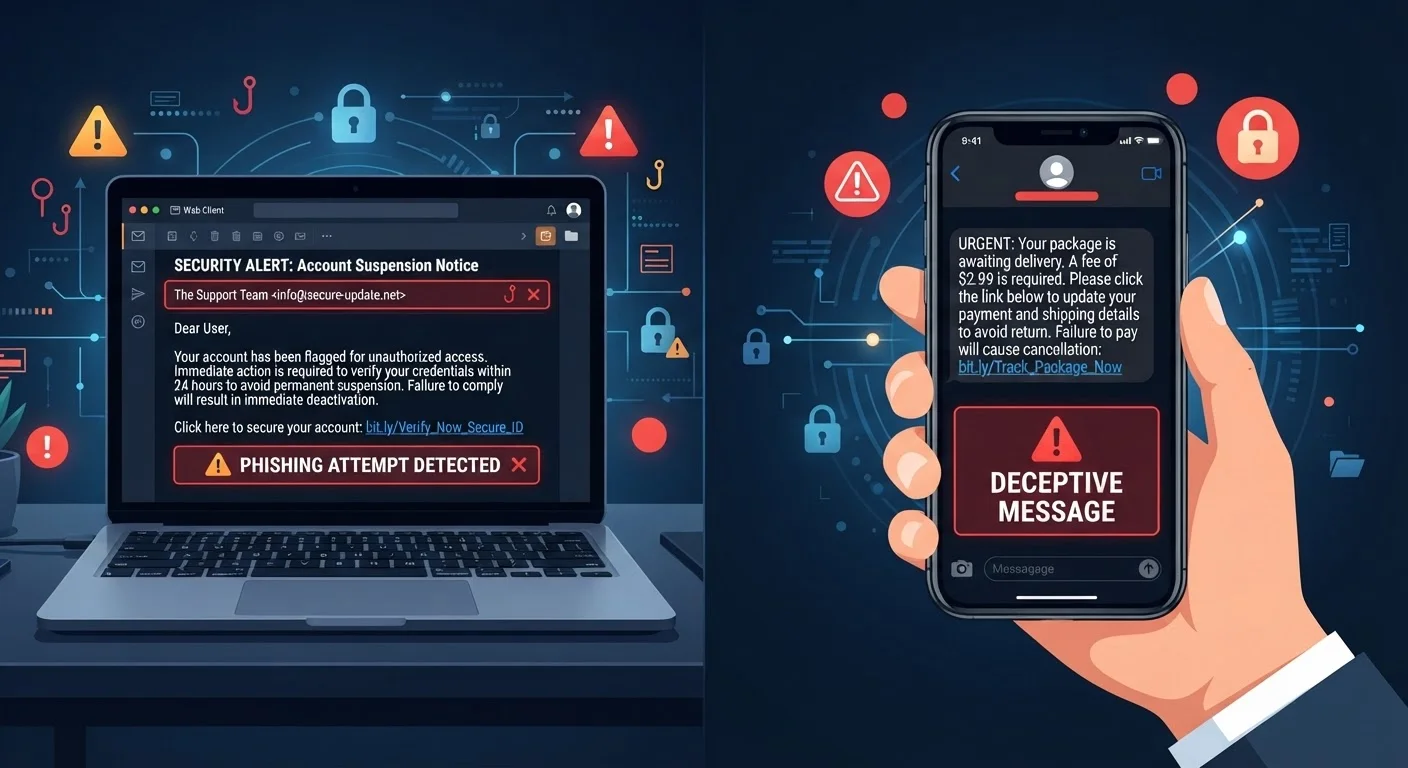
Phishing emails are designed to look like communications from banks, government agencies, retailers, or tech platforms. Attackers register domains that closely mimic legitimate ones - swapping letters, adding hyphens, or using subdomains - so the sender address appears credible at a glance.
A typical phishing email creates pressure: your account has been suspended, a package couldn't be delivered, or unusual activity was detected. It then directs you to a cloned login page where any credentials you enter go straight to the attacker. Some phishing attempts also deliver malware through email attachments.
Because email is a rich-format medium, phishing messages can include logos, formatted text, and professional layouts that closely mirror legitimate brand communications. This visual fidelity is a key reason phishing remains effective even among experienced internet users. Online shopping scams frequently use phishing emails as their entry point, making the two threats closely intertwined.
3.4B
Phishing emails sent per day globally
According to cybersecurity firm AAG, an estimated 3.4 billion phishing emails are sent daily, making it one of the most prevalent forms of cybercrime.
98%
SMS open rate vs. ~20% for email
Industry research consistently shows text messages are opened at far higher rates than email, a key reason attackers increasingly favor smishing as a delivery method.
How Smishing Texts Work
Smishing exploits a key behavioral difference: people tend to open and respond to texts faster than emails, often without the same level of scrutiny. Texts also arrive in a stream alongside messages from people you know, lending them an implicit credibility.
A smishing message is typically short and direct - a fake delivery notification, a fraud alert from a spoofed bank number, or a prize claim prompt. The compressed format leaves little room for the visual red flags (odd formatting, cluttered footers) that sometimes tip off phishing emails. Links in smishing messages often use URL shorteners that obscure the true destination.
Carrier phone numbers can be spoofed, meaning the text may appear to come from a recognizable number or even an alphanumeric sender name like "USPS" or "Chase." If a text prompts immediate action and includes a link, treat it with the same skepticism you would an unsolicited email. The same psychological hooks are at play - urgency, authority, and fear.
It's also worth examining common online safety myths that may leave you more vulnerable than you realize, including the assumption that scams are easy to spot.
Spotting and Responding to Each Threat
For phishing emails, the most reliable defense is scrutinizing the sender address - not just the display name, but the actual email domain. Hover over any link before clicking to see where it actually leads. Legitimate organizations will not ask for your password or full account number via email. When in doubt, navigate directly to the official site rather than clicking any link in the message.
For smishing texts, the rule is simpler: do not tap links in unexpected messages, regardless of how familiar the sender appears. If the message claims to be from your bank or a delivery service, open that organization's official app or type their URL directly into your browser. Forward suspicious texts to 7726 (SPAM) - a shortcode supported by major U.S. carriers that helps filter future smishing attempts.
In both cases, report the attempt to the Federal Trade Commission at ReportFraud.ftc.gov. If you think you may have already engaged with a phishing or smishing attempt, recognizing the early signs of a compromised account can help you act before significant damage occurs. For purchase-specific scams delivered via email or text, spotting fake purchase alerts covers the retailer impersonation angle in detail.
Multi-Factor Authentication Adds a Critical Layer
Even if an attacker obtains your password through a phishing or smishing attempt, multi-factor authentication (MFA) - requiring a second verification step such as a one-time code sent to your phone - can block unauthorized access. Enabling MFA on email, banking, and social media accounts is one of the most effective steps consumers can take. Note that SMS-based MFA, while better than nothing, is considered less secure than authenticator apps, since phone numbers themselves can be targeted.